AI Scheduling ROI: The Formula, Worked for a Six-Technician Shop
AI Scheduling ROI Comes Down to One Uncomfortable Question
Not how much the software will save you — that question has a vendor-supplied answer waiting for it, and you already distrust the answer, which is why you are reading a formula instead of a landing page.
The question that actually decides your AI scheduling ROI is narrower: when the software gives an hour back, where does that hour go? Onto a customer's invoice, off your overtime bill, or into a slightly easier afternoon that costs exactly what it did before. Only two of those three are money. Every honest ROI case is built on that distinction, and every inflated one skips it.
The Formula
Monthly return, stated plainly:
ROI = (drive-time recovery + utilization gain + admin hours saved + fewer missed or late jobs) − subscription cost
Each term, in one line:
- Drive-time recovery — technician hours per month that stop being spent between jobs, valued at your loaded hourly cost.
- Utilization gain — the portion of that recovered time large enough, and early enough in the day, to hold a job you can actually bill.
- Admin hours saved — dispatcher and owner time no longer spent building, rebuilding and defending the board.
- Fewer missed or late jobs — margin on work that would have been lost to a double-booking or an arrival outside the window.
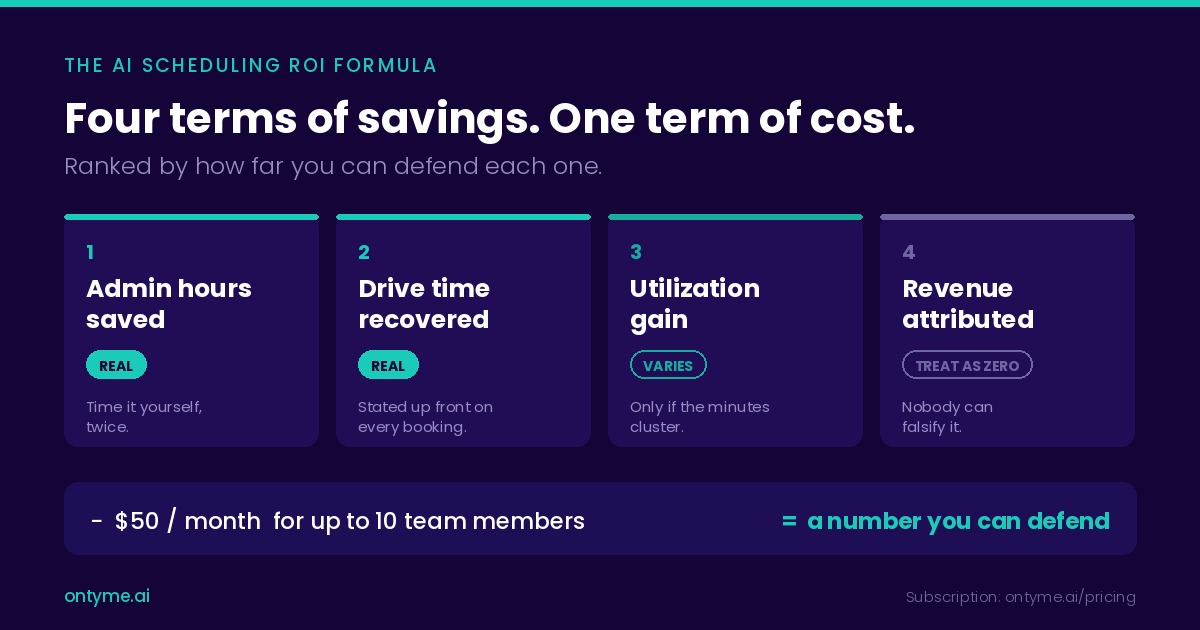
- Subscription cost — OnTyme pricing is $50 per month for up to ten team members, $5 per month for each additional user, after a 30-day trial.
The Four Savings, Honestly Ranked
1. Admin hours saved — reliably real, and the easiest to verify. Your dispatcher spends a measurable stretch of every morning assembling the day and another every afternoon repairing it. Software that proposes the assignment changes that work from composition to review. Time it this week, time it again in month two — no instrumentation, no faith required.
2. Drive-time recovery — real, and measurable per job. When a scheduler picks a slot by minimising the travel before and after a job, the arithmetic is visible at the moment of the decision, not inferred at quarter end. In OnTyme each recommendation carries a plain-English reason line naming the gap it found and the travel it costs, so the saving is stated up front on every booking.
3. Utilization gain — real for some shops, near zero for others. This is where ROI cases quietly inflate. Recovering twenty minutes four times a day is eighty minutes, and eighty minutes is not a job. It is four slivers. Whether recovered time becomes billable work depends on job density, job length and how those minutes cluster — and for long installs in a spread-out territory, the honest answer is often that it does not convert at all.
4. Revenue attributed to the software — treat as zero. Vendors love this term because it is the largest and the least falsifiable. Erik Brynjolfsson made the general case in "The Productivity Paradox of Information Technology" (Communications of the ACM, Vol. 36, No. 12, 1993, DOI 10.1145/163298.163309): returns on information technology are systematically hard to pin down, partly because organisations buy technology without being able to quantify what it produced. Your revenue moved for a dozen reasons last quarter; assigning the delta to a scheduling tool is a story, not a calculation.
Missed and late jobs sit at the boundary. OnTyme sends reminder notifications, but whether they moved your no-show rate is a claim you can only make if you were counting no-shows beforehand. Most shops were not. Leave the term at zero and be pleasantly surprised.
Worked Example: A Six-Technician Shop
Every assumption is labelled. Two are sourced; replace the rest with your own.
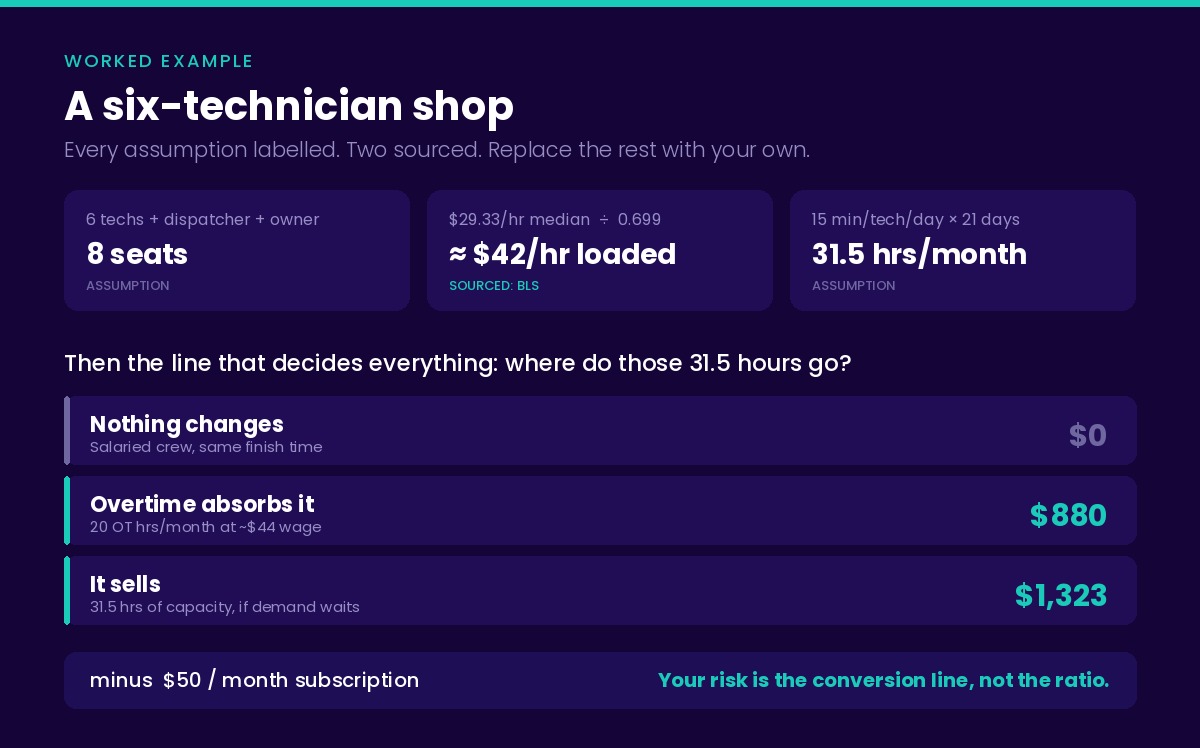
The baseline. Six technicians, one dispatcher, one owner — eight seats. Median pay for heating, air conditioning and refrigeration mechanics and installers was $29.33 per hour as of May 2025, per the U.S. Bureau of Labor Statistics Occupational Outlook Handbook. Wages are not what a technician costs you: across private industry, wages and salaries were 69.9% of total employer compensation cost in March 2026, per the BLS Employer Costs for Employee Compensation release. Divide $29.33 by 0.699 and the loaded figure is about $42 an hour. Both figures are American. In Ontario the Job Bank median for HVAC mechanics is $37.00 an hour before burden (Statistics Canada Labour Force Survey, 2023–2024, updated 7 August 2026), and no comparable burden share is published, so build your loaded rate from your own payroll and run the same four lines.
The recovered time. Assume fifteen minutes per technician per day — deliberately unambitious, small enough to be uninteresting to argue about. Six technicians across twenty-one working days is 1,890 minutes, or 31.5 hours a month.
The conversion — the line that decides everything. Those 31.5 hours are worth between nothing and roughly $1,300, depending on what happens to them:
- Nothing changes. Technicians are salaried, they finish at the same time, the day is simply less frantic. Realised saving: $0. This outcome is common and no vendor will describe it to you.
- Overtime absorbs it. Recovered time eats into paid overtime first. At time-and-a-half on the $29.33 base that is about $44 an hour in wages alone, before payroll taxes. But you can only save overtime you were paying: if the shop books twenty overtime hours a month, twenty is the ceiling, worth roughly $880. The other 11.5 hours convert at zero.
- It sells. The minutes cluster into openings long enough to hold real work, and you bill them. At $42 an hour loaded, 31.5 hours is $1,323 of capacity — but capacity is only revenue if demand is waiting. If your board has gaps because the phone is quiet, better scheduling does not fix that and should not be credited with fixing it.
The admin line. If your dispatcher spends 45 minutes a day on the board and half of that goes away, that is roughly 8 hours a month at whatever they cost loaded. You know that number. We will not guess it for you and add it to a total.
The cost line. Eight seats fits inside the base plan: $50 per month, flat.
The result. Somewhere between $0 and about $2,000 a month against a $50 subscription. That range is the honest output, and its width is the point. Payback in months is subscription divided by realised saving — at $50, that division is not where your risk lives. Your risk lives in the conversion line, and no calculator can answer it, because the answer is a decision about your own payroll.
What Moves Your Number Most
Job density. Tight territories with short jobs recover minutes that cluster into sellable openings. Spread-out territories with long installs recover slivers. Density is the strongest single predictor, and it is geography, not software.
Current chaos level. If your board is built from one person's memory and rebuilt three times a day, the admin term is large and lands immediately. If you already run a disciplined board, that term is small — you captured most of it by hand, and you are buying resilience rather than savings.
Whether you pay overtime. Shops paying regular overtime convert recovered hours into cash automatically, because the hours come off the most expensive part of the payroll first. Shops with no overtime have to sell the time or save nothing.
The uncomfortable pattern: the shops with the most to gain are the ones in the most pain. If you are already good at this, expect a modest return and buy for the failure modes — the double-booking that does not happen, the day the dispatcher is off.
Run Your Own Numbers
There is no calculator on this page; one would only launder our assumptions into your business case. The arithmetic is four lines. Open a spreadsheet.
- Loaded hourly cost. Annual wage plus benefits and payroll taxes, divided by roughly 2,000 hours. With only the wage, divide by 0.7 per the BLS split above.
- Minutes recovered per technician per day. The one number to measure rather than assume. Start at ten if you have nothing — small enough that nobody can accuse you of stacking the deck.
- Conversion rate. The share of recovered hours that will actually leave your payroll or land on an invoice. Be brutal. For a salaried crew with no overtime and no waiting demand it is close to zero — buy for the admin term instead.
- Monthly subscription. Seats times price. For most shops under ten people, $50.
Multiply lines one through three, add the admin saving you timed yourself, subtract line four. That number is yours, and it survives a conversation with your bookkeeper in a way a vendor's will not.
The baseline data you need first. Before-and-after only means something if the "before" exists. For two weeks before you change anything, capture working minutes per technician per day, jobs completed per technician, and dispatcher time on the board. OnTyme's admin reports surface completed events, total working minutes, an efficiency score, overlap incidents and late clock-outs once you are running — but the pre-switch baseline is on you, and a notebook is sufficient.
Beyond the Formula
Some of what changes has no line, and naming these honestly beats pricing them dishonestly. The dispatcher stops carrying the whole board in their head, which matters most on the day they are sick. The owner stops rebuilding tomorrow at 9 p.m. Technicians spend less of the day being reassigned by phone. Customers get an arrival window that holds.
These are real, and they are exactly the benefits vendors inflate into six-figure claims. We would rather list them without a dollar sign and let you decide what they are worth.
Two Things This Does Not Buy You
Route sequencing is not slot selection. Choosing when and to whom a job goes, by minimising the travel around it, is a different problem from re-ordering a day's stops into an optimal loop. Savings modelled on route optimization do not transfer — see how those layers differ.
The board does not rebuild itself. When a technician calls in sick, jobs are reassigned one at a time by a person deciding. There is no board-wide re-solve. Any ROI line built on automatic cascade recovery is built on a capability you should verify before you pay for it — from any vendor, this one included. How AI scheduling actually works covers the mechanics.
Frequently Asked Questions
How do you calculate ROI on scheduling software?
Add drive-time recovery, utilization gain, admin hours saved and reduced missed jobs, valued at your loaded labour cost, then subtract the subscription. The arithmetic is trivial; estimating those four terms honestly is not.
How much does dispatch software save per technician?
There is no defensible industry figure, and any vendor quoting one without a dated study is guessing. Build it yourself: minutes recovered per technician per day, times your loaded hourly cost, times the share that will actually leave your payroll or reach an invoice.
How fast does field service software pay for itself?
At $50 a month for a shop under ten people, faster than the arithmetic is interesting — one hour of recovered overtime covers most of a month. Payback period is a weak question here; the better one is whether recovered time converts to cash at all.
What data do I need to calculate scheduling ROI?
Five: loaded hourly labour cost, technician count, minutes of drive time recovered per technician per day, the share of those minutes you can convert, and dispatcher time on the board. Only the third and fifth need measuring, and two weeks of observation covers both.
Are vendor ROI claims realistic?
Treat any claim you cannot reproduce from your own numbers as marketing. The tell is a revenue-attribution line: largest term, nobody can falsify it. A vendor willing to show the assumptions behind each term, and to name which customers see small returns, is giving you something more useful than a big number.
Build the Case, Then Test It
The math is on the table, including the parts that argue against buying. Run your four lines, be honest about the conversion rate, and if the number holds, the 30-day trial is long enough to test the recovered-minutes assumption against reality.
Talk to us about your numbers — bring your technician count and drive-time estimate and we will work through it, including the case where the answer is no. Earlier than that, start with what AI scheduling is.