AI for Field Service in 2026: Receptionists, Dispatchers and Schedulers, Mapped
Why Every Vendor Suddenly Says "AI"
Shopping for AI for field service in 2026 is a filtering problem more than a technology problem. Between December 2025 and May 2026, the share of U.S. businesses reporting they used AI in any business function sat between 17% and 20%, and among firms with four or fewer employees it stayed under 20% with no significant change (U.S. Census Bureau, Business Trends and Outlook Survey, published 26 May 2026). A Federal Reserve review of the same period put firm-level adoption near 18% while finding 41% of the labour force had used generative AI at work (J. S. Allen, FEDS Notes, 3 April 2026). People are using it. Companies mostly have not bought it yet — while every vendor email says the opposite.
Three questions do most of the filtering. Is the category mature, or does it only work on the vendor's script? Does it connect to what you already run? And how densely does it concentrate return — dollars moved per hour you spend setting it up?
Disclosure before the argument: we build one layer of this stack, the scheduler, and the adoption order below puts our layer first. So it is written to be checked, not believed — every step names a number you can measure yourself.
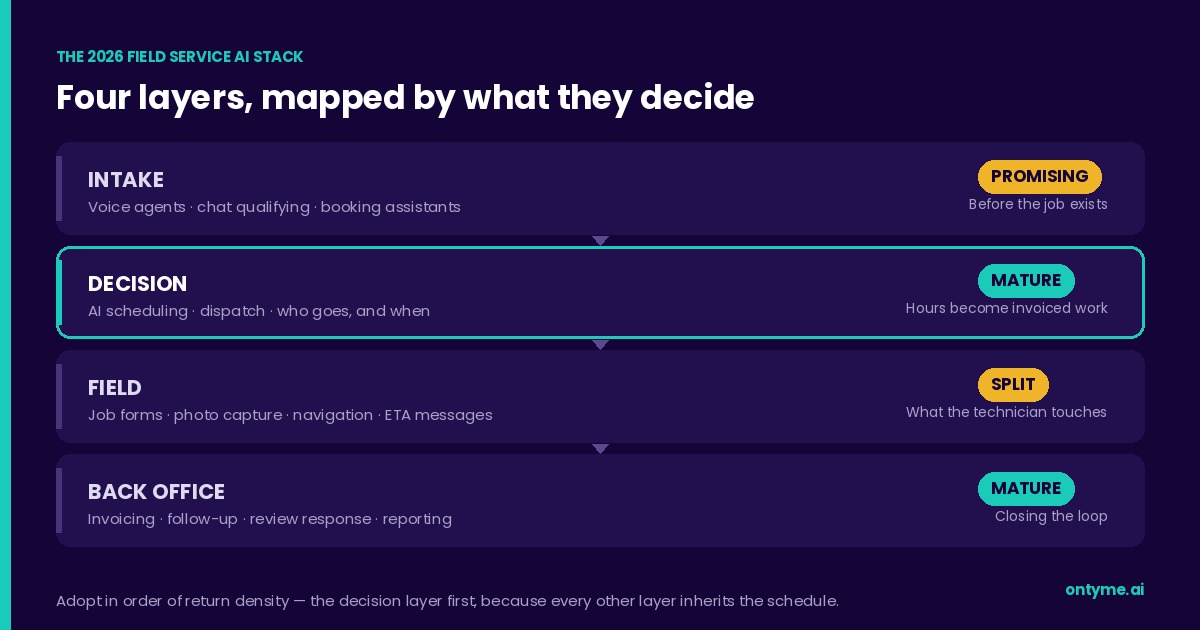
AI for Field Service, Mapped in Four Layers
The intake layer is everything before a job exists: voice agents that answer the phone after hours, chat widgets that qualify a lead, booking assistants that offer the caller a window. Its job is to stop revenue leaking out of unanswered calls.
The decision layer turns a job into an assignment — who goes, when, and how the day gets built. This is scheduling and dispatch, the layer where labour hours convert into invoiced work, and every other layer inherits what it decides.
The field layer is what the technician touches: navigation, job forms, photo documentation, the ETA text to the customer. Its job is to take paperwork off a person standing in someone's basement.
The back-office layer closes the loop — invoicing, follow-up, review requests, reporting. Least glamorous, often the easiest to automate, because most of it is rules rather than judgement.
Those four layers hold two different technologies that both correctly carry the AI label, and confusing them is where most buying mistakes start. Optimization decides: it searches a space of possible answers against constraints and picks the best by a stated objective. Search of that kind is the oldest branch of the field, not a lesser cousin of it — Newell and Simon built their Turing Award lecture on exactly that claim (A. Newell and H. A. Simon, "Computer Science as Empirical Inquiry: Symbols and Search," Communications of the ACM, Vol. 19, No. 3, 1976, pp. 113–126, DOI 10.1145/360018.360022). Machine learning and the language models built on it generate and predict: they need training data, and they are strongest where the output is a draft a human reviews.
OnTyme runs one of each, and they behave nothing alike. The scheduler is optimization: it enumerates candidate installers, dates and 30-minute start times, discards anything that breaks a hard constraint, and returns the candidate with the lowest total travel time — no history required, so it works on your first day. The form builder is generative: describe an appointment type in plain English and a language model drafts the field list, which you review and import, or throw away. One decides, one drafts. The one that decides is worth more per month.
Maturity Ratings for 2026
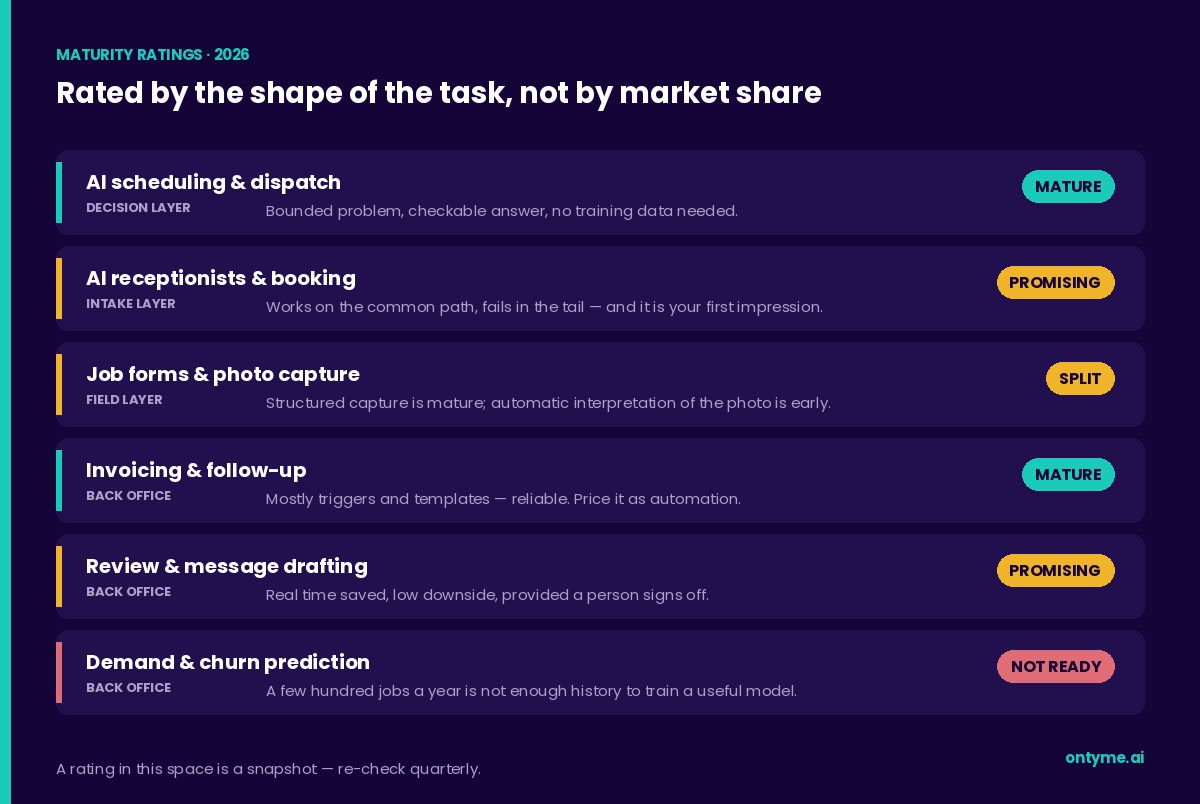
These are ratings by argument, not by market share. Each comes from a property of the task itself — how bounded the problem is, whether a wrong answer is visible, and how much of your own data the tool needs before it earns its subscription. Re-check them quarterly; a rating in this space is a snapshot.
- AI scheduling and dispatch (decision layer) — mature. The problem is bounded and the answer is checkable. Constraints either hold or they do not, travel arithmetic either adds up or it does not, and the reasoning fits on one screen. No training data required, so no cold start.
- AI receptionists and booking agents (intake layer) — promising. The technology works on the common path and fails in the tail: a caller on a job site with a compressor running, a customer who changes the address mid-sentence, an accent the model handles badly. The failure is expensive because this is your first impression. Call it twenty times from a truck before you buy it.
- Job forms, photo capture and technician copilots (field layer) — split. Structured capture is mature and boring in the best sense. Automatic interpretation of what is in the photo is early: the output is a suggestion, and a suggestion that becomes a warranty claim is not a saving.
- Invoicing and follow-up automation (back-office layer) — mature, and mostly rule-based. Much of this layer is triggers and templates, which is a compliment: rules are predictable and they do not surprise you at month end. Price it as automation and expect automation reliability.
- Review response and customer messaging drafts — promising. Real time saved, low downside, provided a person signs off before anything is published.
- Demand forecasting and churn prediction for a single-market shop — not ready. The honest "no" on this list. Prediction models need volume and variety, and a business doing a few hundred jobs a year in one metro does not have the history to train a model that beats an experienced owner's judgement.
Adoption Order: Where the Return Concentrates
Rank by return density, not by how impressive the demo is. Return density is dollars moved per hour of setup and per dollar of subscription.
First, the decision layer. A scheduling decision is the moment labour hours become invoiced work, and it is the one decision every other layer inherits. A better-answered phone still hands the job to a dispatcher who has to place it. Start where decisions become dollars. The arithmetic behind that claim — which savings hold up and which are oversold — is worked line by line in our ROI breakdown for a six-technician shop. If the category is new to you, start with what AI scheduling is, then how it actually works.
Second, the intake layer. Missed calls are lost jobs, but measure yours before buying a fix. Pull one month of phone records, count inbound calls in business hours that nobody answered, multiply by your close rate and average ticket. That number is your budget for this layer — any figure a vendor quotes you was measured in someone else's business.
Third, the field and back-office layers. Real savings, but they show up as minutes rather than jobs: a form filled once instead of twice, an invoice that goes out the same evening, a review request that sends itself. Worth doing last, because they tidy an existing schedule rather than putting more work on it.
Argue with the order if your numbers say otherwise. The method is the part that holds: rank by measured return, and make each vendor name the number in your business they intend to move.
Integration Reality
The layers do not connect as neatly as the diagram implies. Most tools in this stack were built as standalone products, and "we integrate" covers everything from a native two-way sync to a spreadsheet export you run on Fridays.
Ask for the write path in specifics. When your AI receptionist books an appointment, does it write into the calendar your scheduler reads, and does the scheduler see it in time to place the job? Ask what breaks when that connection fails at 7 p.m. on a Friday, and who notices. Ask whether the integration ships today or sits on a roadmap, and get the answer in writing.
The failure mode this prevents has a name: tool sprawl. Four AI subscriptions become four logins, four bills and four disagreeing accounts of the same Tuesday, at which point your dispatcher becomes the integration layer — worse than the manual process you replaced, because it costs more and hides the mistake for longer. One layer that works and connects beats three that impress in isolation. On our side, API access and integrations sit on the Enterprise plan, listed on the pricing page; that level of specificity is what to demand from every vendor.
A Sane 12-Month AI Roadmap
Copy this into a document and fill in your own numbers. It is deliberately slow: one layer per quarter, with a measurement window before and after each one.
- Q1 — measure. Record three baselines before you buy anything: unanswered inbound calls per month, hours per week spent building and rebuilding the schedule, and average jobs completed per technician per week. Without these you cannot tell later whether anything worked.
- Q2 — decision layer. Trial one scheduling tool with real jobs, not a sandbox. Success criterion set in advance: either scheduling hours drop or completed jobs per technician rise. If neither moves in a full quarter, stop paying for it.
- Q3 — intake layer. Only if your Q1 missed-call number justifies it. Run the AI receptionist alongside your current answering method for a month rather than replacing it outright, and read the transcripts.
- Q4 — field and back office, then review. Add job forms, automated ETA messages or invoicing follow-up. Then re-measure all three Q1 baselines and cancel whatever did not move a number.
On budget: get a written quote per seat per month from every vendor and add them up against those baselines. We are not publishing dollar ranges for categories we do not sell, because any range we invented would be a guess dressed as research. Our own layer is public — $50 per month for 10 team members, $5 per additional user, 30-day free trial, on the pricing page.
The stack is real and the hype is optional. Start at the decision layer, prove it against a number you measured yourself, and build outward. To see that layer on a live day, talk to us — or read the user guide first and decide on your own time.
Frequently Asked Questions
What AI tools do field service companies use?
Four layers: intake (voice agents, booking assistants), decision (scheduling and dispatch), field (job forms, photo capture, navigation, ETA messages) and back office (invoicing, follow-up, review response, reporting). Most businesses adopt one layer at a time rather than a suite.
Are AI receptionists worth it for service businesses?
It depends on a number you can measure: unanswered inbound calls in business hours per month, times your close rate, times your average ticket. If that figure is large, the layer pays for itself. The technology works well on ordinary calls and less well on noisy ones, so test it from a truck before committing.
What AI should a service business adopt first?
The decision layer — scheduling and dispatch. It is the most mature category, it needs no historical data to start working, and it sits at the point where labour hours become invoiced revenue. Every other layer inherits the schedule it produces.
How do AI field service tools work together?
Often less well than advertised. Ask each vendor for the specific write path between their tool and the others you run, what happens when that connection fails, and whether the integration exists today or is on a roadmap. Fewer connected tools beat more disconnected ones.
Is AI dispatching mature enough to trust?
Yes, with one caveat: you should be able to see its reasoning. A scheduler working by constraint and search produces an answer you can check. OnTyme returns a plain-English reason with every recommendation, naming the gap it found — "Gap between jobs", "End-of-day gap" — with the travel before, the job length, the start time and the travel after. Trust the ones that show their work, and override them whenever you know something the system does not.