
OnTyme for cleaning
Scheduling, routes and checklists for cleaning teams
A cleaning business runs on regular clients plus a steady stream of deep cleans and move-outs. OnTyme keeps each client’s visits on one job, plans the day around drive time, and gives cleaners a checklist with photos so every clean can be confirmed.
Where the week usually goes wrong
Regular clients are booked from memory
Who is due this week lives in someone’s head or a spreadsheet, not on the schedule.
Cleaners criss-cross the area
Jobs are handed out by availability, not by where the cleaner will already be.
“Was the kitchen done?”
Without a checklist and photos, a client complaint is your word against theirs.
Hours are hard to reconcile
Time on site is reported after the fact, which makes payroll a weekly argument.
How OnTyme handles it
-
A job for every client
Set up each client or property as a job, then book every clean as an event on it. Refer & Create Event schedules the next visit with the same details.
-
Room-by-room checklists
Build a form for each clean type with checkboxes for every room, a text area for issues and required photos.
-
A sensible route
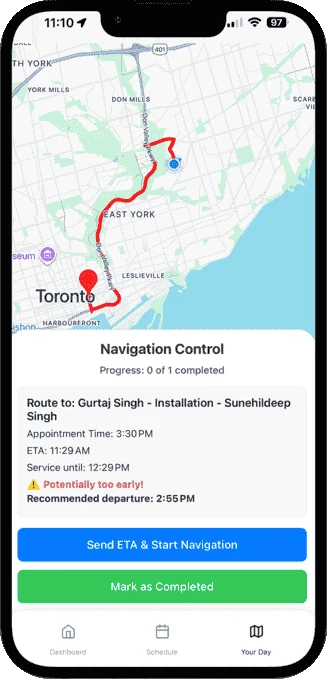
AI scheduling accounts for travel time between jobs, and cleaners calculate the route and send the client an ETA from Your Day.
-
Time off respected
Vacation blocks and company holidays stop anyone being booked on a day off.
-
Clock in, clock out
Cleaners clock in and out on each appointment, recording the actual time on site with optional notes.
-
Reports for payroll
Download job reports with technician and tag breakdowns as CSV for payroll or analysis.
Example appointment types
Example form fields
You define these in Form Management — they aren’t fixed templates.
Questions from cleaning teams
How do I manage regular cleaning clients?
Can cleaners tick off a checklist on their phone?
Can I use OnTyme’s time records for payroll?
See the full feature list on the product page or check pricing.
Put your next week on OnTyme
Set up your company, add your team and schedule real jobs during your 30-day free trial.
Standard plan: $50 CAD/month for 10 team members, plus $5/month per additional user.