
OnTyme for handyman
Handyman scheduling for a list of jobs that never looks the same twice
A handyman’s week is dozens of small jobs of every length: a door to rehang, shelves to fit, a leak to look at. OnTyme fits each one where it makes sense, keeps every customer’s history together, and records what was done with photos.
Where the week usually goes wrong
Every job is a different length
A 30-minute fix and a half-day assembly are hard to slot together without wasting the afternoon.
Estimates turn into lost jobs
The estimate visit happens, but booking the actual work slips through the cracks.
Customer history is scattered
“What did you do here last time?” means scrolling through texts and photos.
Time and materials go unrecorded
Notes on a receipt or in your head make invoicing slow and inaccurate.
How OnTyme handles it
-
AI fits each job where it belongs
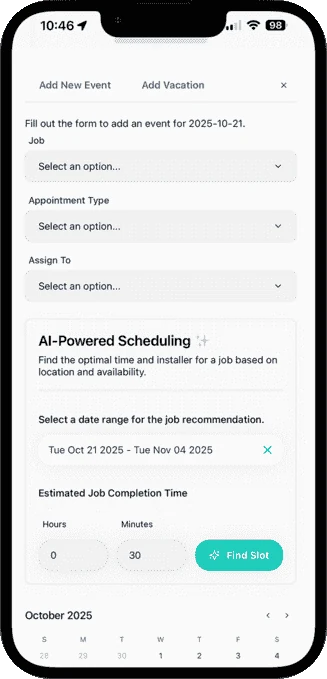
Enter how long the job will take; OnTyme checks schedules, location, work hours and travel time to recommend the best available slot.
-
Estimate to job in one step
After the estimate visit, Refer & Create Event books the work on the same job with the customer and site already filled in.
-
Find any customer or past job
Global search covers customers, jobs and events, and every event keeps its form submissions and photos.
-
Record tasks, time and materials
Build a simple form with text areas for tasks and materials, number fields and photo upload. The AI Form Generator can draft it for you.
-
ETAs without the phone call
Calculate the route from Your Day and tap Send ETA & Start Navigation to let the customer know you’re coming.
-
Organise work with tags
Tag jobs by type or priority, then filter the calendar by tag, appointment type, status or person.
Example appointment types
Example form fields
You define these in Form Management — they aren’t fixed templates.
Questions from handyman teams
Can OnTyme work for a one-person handyman business?
Do I need a different form for every type of job?
How do I look up what I did for a customer before?
See the full feature list on the product page or check pricing.
Put your next week on OnTyme
Set up your company, add your team and schedule real jobs during your 30-day free trial.
Standard plan: $50 CAD/month for 10 team members, plus $5/month per additional user.