
OnTyme for plumbing
Plumbing dispatch with ETAs, photos and a clear view of the day
Plumbing days rarely go to plan: a burst pipe or blocked drain arrives between booked estimates and installs. OnTyme shows every plumber’s day side by side, recommends who can take the next job, tells the customer when the plumber is on the way, and records the job with photos.
Where the week usually goes wrong
Urgent calls break the schedule
Fitting an emergency in means phoning around to find out who is closest and who is free.
Customers keep calling for updates
A homeowner with water on the floor wants to know exactly when the plumber will arrive.
Work isn’t documented consistently
Without before and after photos, warranty questions and disputes come down to memory.
The office can’t see who is on site
Dispatchers don’t know which jobs have started until a plumber calls in.
How OnTyme handles it
-
Every plumber in one view
Day view puts each plumber in their own column. On desktop, drag an event to a new time and confirm the change.
-
Recommended plumber and time
Set a short date range and the estimated job time; AI scheduling weighs location, existing appointments and travel time to suggest the best available slot.
-
ETAs sent from the van
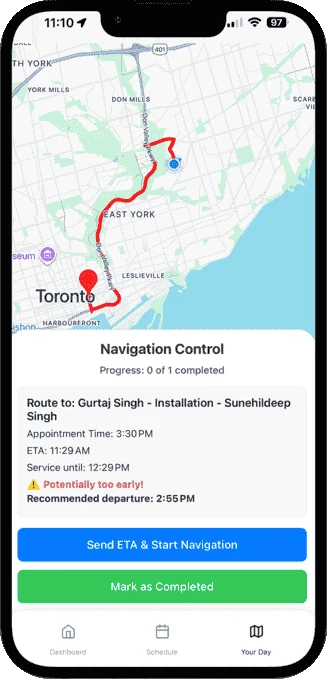
Send ETA & Start Navigation notifies the customer with the plumber’s name, arrival time and job reference, then opens GPS navigation.
-
Required before and after photos
Add image upload fields to the job form and mark them required, so the form can’t be submitted without them.
-
Know who is clocked in
Plumbers clock in and out on each appointment. Team Pulse on the admin dashboard shows who is working right now.
-
Works in basements and crawl spaces
If there is no signal, form submissions are saved on the device and synced when the connection returns.
Example appointment types
Example form fields
You define these in Form Management — they aren’t fixed templates.
Questions from plumbing teams
How do I fit an emergency call into a full day?
Can I require photos before a job is closed out?
What does the customer receive when the plumber is on the way?
See the full feature list on the product page or check pricing.
Put your next week on OnTyme
Set up your company, add your team and schedule real jobs during your 30-day free trial.
Standard plan: $50 CAD/month for 10 team members, plus $5/month per additional user.