
OnTyme for window coverings
Scheduling and job forms for window covering measures and installs
A blinds and shades business runs on two kinds of visits: the measure and the install. OnTyme keeps both on one calendar, recommends the installer and time for each visit, and puts the measurement form and photo upload in the installer’s hand on site.
Where the week usually goes wrong
Measures and installs live in different places
The measure is in one calendar, the order in another, and the install date in a text thread. Nobody can see the whole job.
Measurements come back incomplete
A missing mount type or an unreadable width means a second trip, a re-order, or both.
Installers zig-zag across town
Long install windows are booked wherever there is a gap, not where the installer will already be.
Customers wait at home without an update
The office fields “when will they get here?” calls all afternoon.
How OnTyme handles it
-
One job, every visit
Create the customer and job once, then schedule the measure, the install and any follow-up as events on the same job. Refer & Create Event carries the context forward.
-
A measure form installers actually finish
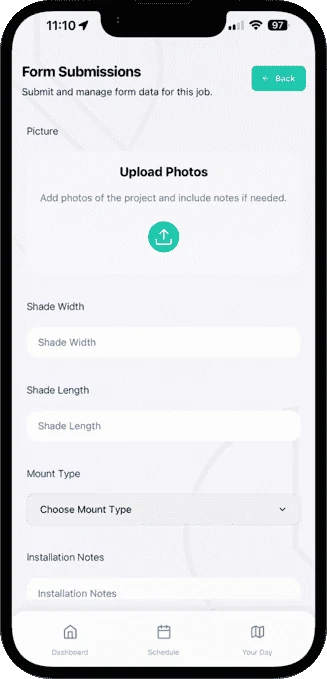
Build a form for each appointment type with the exact fields you need: width, length, mount type, notes and required photos. The AI Form Generator can draft it from a description.
-
AI picks the installer and slot
Enter how long the install will take; OnTyme checks installer schedules, location, work hours, vacations, holidays and travel time to recommend the best available slot.
-
ETAs without phone calls
From Your Day, installers calculate the route and tap Send ETA & Start Navigation to notify the customer before they set off.
-
Measurements ready for ordering
Review submissions on the event, export them as XLSX or email them straight from the Forms tab.
-
Real time on site
Clock in and clock out records how long each install actually took, so the next estimate is better.
Example appointment types
Example form fields
You define these in Form Management — they aren’t fixed templates.
Questions from window coverings teams
Can I build my own measure and install forms?
Can installers fill in forms without signal?
How do I get measurements to the office or a supplier?
See the full feature list on the product page or check pricing.
Put your next week on OnTyme
Set up your company, add your team and schedule real jobs during your 30-day free trial.
Standard plan: $50 CAD/month for 10 team members, plus $5/month per additional user.