The OnTyme platform

Everything your field team needs, from first booking to finished job

OnTyme connects your office and your technicians: one schedule, one record for every customer and job, and one app in the field for routes, ETAs, forms, photos and time on site.

Scheduling & dispatch

One calendar for every technician and appointment, with the views a dispatcher actually uses.

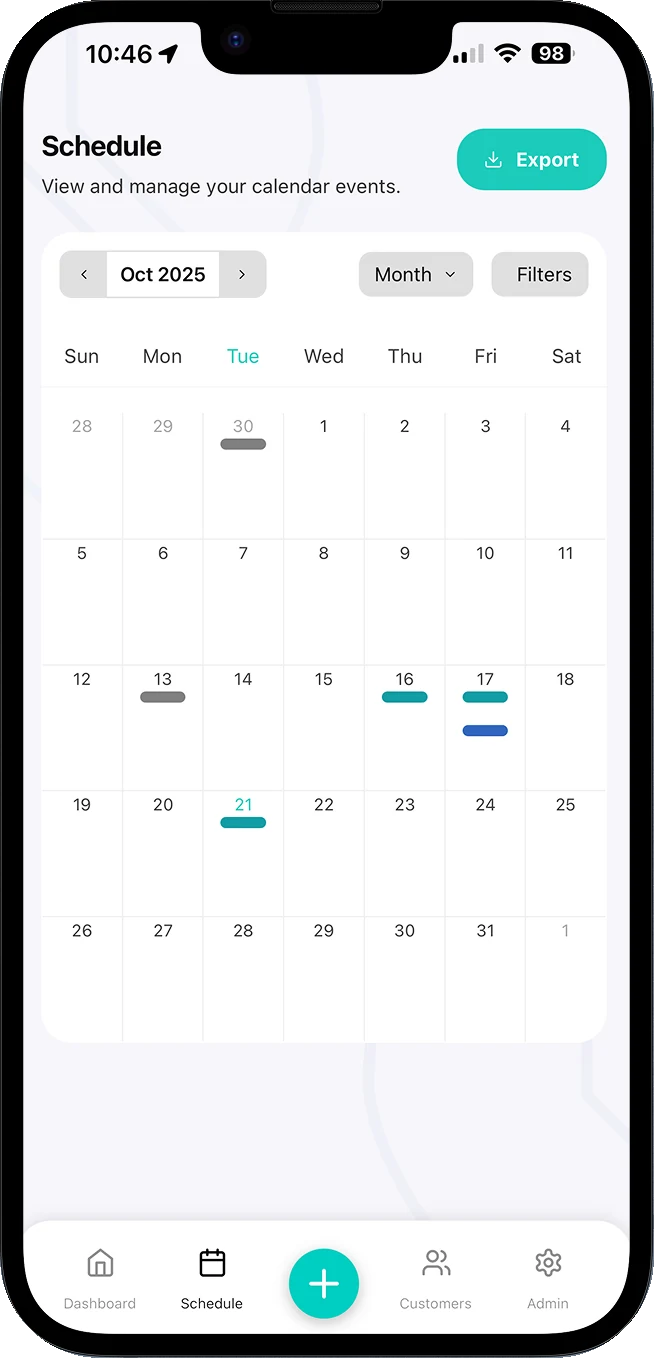
  • Month, Week, 3 Days, Day and Schedule (agenda) views
  • Day view gives every technician their own column for conflict checking
  • Drag an event to a new time on desktop and confirm the change
  • Filter by tags, appointment types, statuses and technicians
  • Colour-coded statuses: upcoming, in progress, complete, incomplete and missed
OnTyme Schedule screen in month view, showing scheduled events on the calendar with Month and Filters controls and an Export button.
Month view · filters · export

AI scheduling

Ask for the best technician and time for a job, and get a recommendation you can accept in one tap.

  • Considers job location, estimated job duration and technician schedules
  • Accounts for working hours, vacations, company holidays and travel time between jobs
  • Choose priority technicians and the date range to search
  • Review the recommended slot, then Accept & Assign
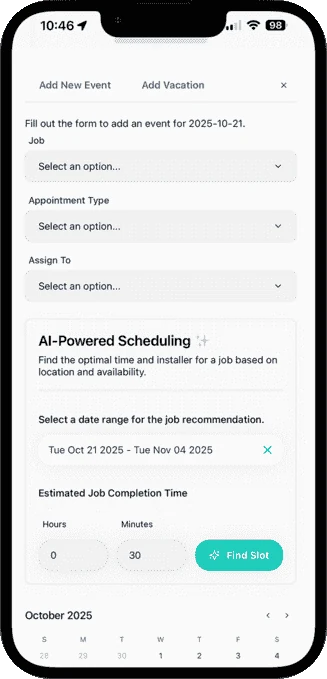
OnTyme Add New Event form with the AI-Powered Scheduling panel: a date range for the recommendation, estimated job completion time and a Find Slot button.
Date range + duration → Find Slot

Field team mobile app

Technicians get their day, their route and their paperwork in one app on iOS or Android.

  • Your Day: today’s appointments on a map with a progress counter
  • Destination cards with appointment time, phone number and address
  • Push notifications for new assignments and time changes
  • Next Up card on the dashboard for the next appointment
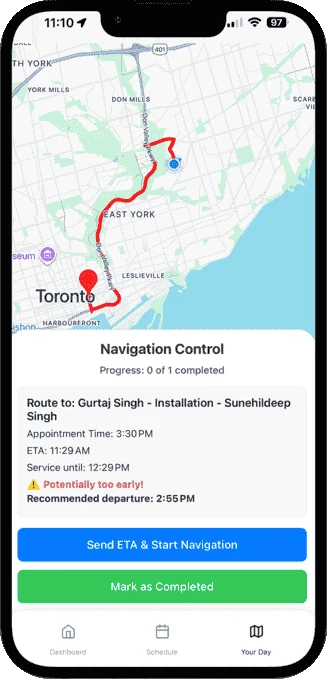
OnTyme Your Day navigation screen: a route on the map, appointment time, ETA, an early-arrival warning, recommended departure time and a Send ETA & Start Navigation button.
Early-arrival warning + Send ETA

Forms & documentation

Digital job forms tied to each appointment type, so every visit is recorded the same way.

  • Build forms per appointment type: text, number, email, dropdown, checkbox, radio and more
  • AI Form Generator drafts a form from a plain-language description
  • Multiple submissions per event, e.g. one per visit or per day
  • Submissions saved offline and synced when the connection returns
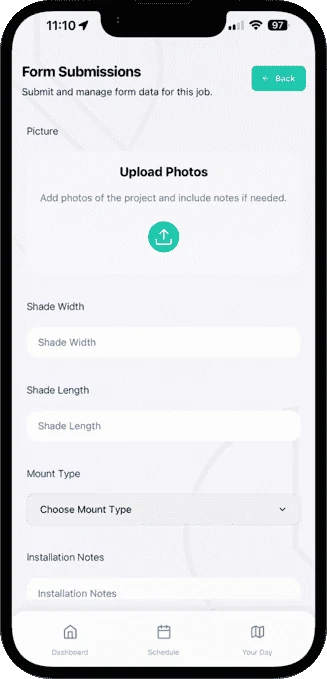
OnTyme Form Submissions screen for a window shade job, with a photo upload area and fields for shade width, shade length, mount type and installation notes.
Photo upload inside the job form

And the rest of the workflow

Built for the whole job, not just the calendar

Jobs & customers

Every customer, job site and appointment connected, so history is never in a text thread.

  • Customer records with contact details, address and linked jobs
  • Jobs with site location, additional contact, travel time, site photo and status
  • Import customers from a CSV template
  • Global search across customers, jobs and events
  • Refer & Create Event to book follow-up visits with the same job context

Routes & ETAs

Calculate the drive, warn about early or late arrival, and tell the customer when you’ll be there.

  • Calculate Route shows the driving route, ETA and service completion estimate
  • Warnings when a technician may be late or will arrive too early
  • Send ETA & Start Navigation notifies the customer and opens GPS navigation
  • Or skip the ETA and start navigating

Photos & proof of work

Photos are captured inside the job form, attached to the event and visible to the office.

  • Image upload fields on any form
  • Required-image checks before a form can be submitted
  • Submissions, images and timestamps reviewed from the event’s Forms tab

Notifications

Keep technicians and customers informed without a phone call.

  • Push notifications for assignments, time changes and sent ETAs
  • Customer ETA messages with the technician’s name, arrival time and job reference
  • Per-user control of push notifications on mobile

Time & work sessions

Clock in and clock out on each appointment to record actual time on site.

  • Clock in starts the work session; clock out ends it with optional notes
  • Status updates automatically as work starts and finishes
  • Team Pulse on the admin dashboard shows who is clocked in right now

Reporting & exports

See how the week is going and take the data with you.

  • Admin dashboard: total events, jobs and form submissions, completion rates and quick insights
  • Job reports with technician and tag breakdowns as CSV
  • Export form submissions as XLSX, email them, or bulk-export by appointment type and date range

Administration & permissions

Set the rules once and the schedule respects them.

  • Custom roles with permission levels, from read-only to full admin
  • Company work hours, custom holidays and statutory holiday settings
  • Vacation requests and blocks that prevent double-booking
  • Subscription management and billing portal

Integrations

API access and integrations are part of the Enterprise plan. Tell us what you need to connect and we’ll talk through it.

Ask about integrations

Product tour

See OnTyme in action

Want the details? The User Guide walks through every screen, and the Help Center answers common setup questions.

Put your next week on OnTyme

Set up your company, add your team and schedule real jobs during your 30-day free trial.

Standard plan: $50 CAD/month for 10 team members, plus $5/month per additional user.