
OnTyme for HVAC
HVAC scheduling that fits maintenance, repairs and installs into one realistic day
An HVAC week mixes planned maintenance, urgent repair calls and long installs, all competing for the same technicians. OnTyme recommends the technician and time for each visit based on location, duration and drive time, and gives technicians a service form to record the equipment and the work on site.
Where the week usually goes wrong
Repairs and maintenance fight for the same techs
A no-heat call lands on a day already full of tune-ups, and someone has to reshuffle the board by hand.
Drive time is a guess
Visits are booked wherever there is a gap, so technicians spend the afternoon crossing town.
Equipment details get lost
Model, condition and parts used end up on paper or in a photo roll, not on the job.
Return visits lose the context
When parts arrive, the follow-up is booked from memory and the technician starts from scratch.
How OnTyme handles it
-
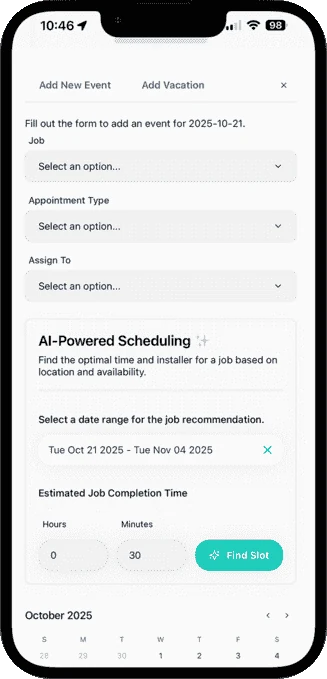
AI finds the technician and slot
Enter the estimated job time and date range; OnTyme checks technician schedules, job location, work hours, vacations, holidays and travel time, then recommends a slot you can Accept & Assign.
-
See every technician side by side
Day view gives each technician a column, so the office can spot where an urgent repair fits. Filter by appointment type, status, tag or technician.
-
A service form for each visit type
Build separate forms for maintenance, repairs and installs, with fields for equipment details, work performed, parts used and required photos.
-
Follow-ups on the same job
Use Refer & Create Event to book the parts-return visit on the same job, so the next technician sees the site and history.
-
Customers know when you’ll arrive
Technicians calculate the route from Your Day and tap Send ETA & Start Navigation to notify the customer before they leave.
-
Reports by technician and tag
Download job reports with technician and tag breakdowns as CSV, and see completion rates on the admin dashboard.
Example appointment types
Example form fields
You define these in Form Management — they aren’t fixed templates.
Questions from HVAC teams
Will OnTyme book a technician who is on vacation?
Can I see what was done on a previous visit to a site?
Can I use different forms for maintenance and repair calls?
See the full feature list on the product page or check pricing.
Put your next week on OnTyme
Set up your company, add your team and schedule real jobs during your 30-day free trial.
Standard plan: $50 CAD/month for 10 team members, plus $5/month per additional user.