

6:58 a.m. The phone rings before the coffee's ready: a technician is down for the day. Every job on their board now needs a decision — move it, cover it, or call the customer — and whoever answers that phone is doing emergency dispatch rescheduling by instinct, because most shops have never written the process down. This is that process. Print it, keep it by the board, and use the last section to see what changes when software handles part of the busywork instead of you.
The first five minutes decide whether the rest of the day is manageable or a scramble. Do this, in order, before you touch the phone.
Everything after this is applying the tiers you just set — not re-deciding them job by job as the phone rings.
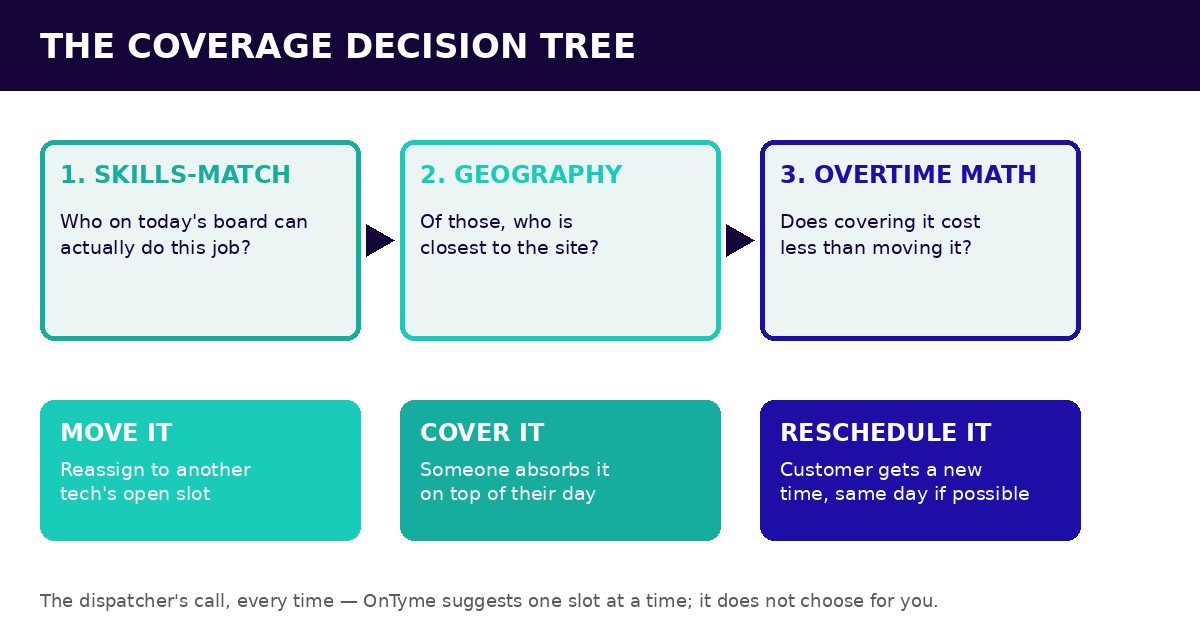
For each job on the frozen board, run the same three questions in order. Skipping the order is how a shop ends up paying overtime for a job that a nearer tech could have absorbed for free.
The answer sorts every job into one of three buckets: move it (reassign to another tech's open slot), cover it (someone absorbs it on top of their planned day), or reschedule it (the customer gets a new time, same day if you can manage it, tomorrow if you can't). Write the bucket next to each job before you start calling anyone.
Timing rule first: a text before 8 a.m. reads as a business staying ahead of a problem. A call at 9:30 to say the tech isn't coming reads as an apology. Send the first message the moment a job's bucket is decided — don't wait until you've solved the whole board.
Three scripts, copy-paste ready. Save this section — screenshot it or drop it into your own SOP so it's on hand next time.
Proactive delay text (job is moving to later today):
"Hi [Name], this is [Company]. We've had a technician emergency this morning and your [time] appointment needs to move. We can still get to you today at [new time] — does that work, or would you rather we call to reschedule?"
Reschedule call opener (job is moving to another day):
"Hi [Name], I'm calling from [Company]. Unfortunately one of our technicians called in sick this morning and I need to move your appointment. I have you down as a priority reschedule — can I get you back on the schedule for [date/time]?"
Same-day-later offer (job is being covered, later slot):
"Hi [Name], quick update on your appointment today — we're running a shortened crew this morning, so we've moved your window to [new time] with [tech name]. Same job, same day, just later. Let us know if that doesn't work."
The easiest mistake in a crisis is fixing today by wrecking tomorrow. Pulling every open slot out of tomorrow's schedule to cover today's gap just moves the emergency forward by twenty-four hours.
Weigh overtime against reschedule honestly. Overtime is a direct, visible cost. A reschedule is an indirect cost — a customer's patience, a slightly worse review, a day that starts a little behind — but it's usually the smaller one, and it doesn't borrow against tomorrow's capacity.
Watch who's absorbing the crisis. If the same one or two technicians are always the ones covering a sick call, that's not resilience, it's a rotation nobody assigned. Spreading emergency coverage across the team on purpose, rather than defaulting to whoever's closest every time, keeps it from burning out your most reliable people.
The playbook above is what a dispatcher does by hand, one decision at a time. Here's what OnTyme's AI-powered scheduling actually automates in that process, and what it deliberately still leaves to you. For the constraint-and-travel-time mechanics behind this, this is how the underlying recommendation works in more detail.
For each displaced job, the recommendation checks the same hard constraints a careful dispatcher would — who's an eligible installer, who isn't on approved vacation or a statutory holiday, who's inside business hours with no overlap on their existing board — and returns a slot that minimizes total travel time, with a plain-English reason attached (which gap it used, and the travel math behind it). That's the skills-match-then-geography judgment from the decision tree above, done in seconds instead of a round of phone calls to check everyone's availability by hand.
It's genuinely useful for the part of the triage that's mechanical — checking a dozen constraints across a dozen technicians faster than a person can, every time, without missing one. It's not trying to make the judgment call in step three of the decision tree, the overtime-versus-reschedule trade-off, or the fairness call about who's been covering every crisis lately. Those stay yours.
It does this one job at a time. There's no single button that re-solves the whole board at once, and nothing that cascades a change across every other job automatically — each displaced stop gets its own recommendation, reviewed and accepted individually. And notifying the customer is still something a person does: the app can send an ETA text with a running-late, early, or on-time status once a dispatcher or technician triggers it, but nothing goes out to a customer on its own just because a job moved.
So the honest version of "the 90-second version" is: the recommendation engine does the constraint-checking and travel math from the coverage decision tree, fast, one job at a time — and you still make the call on the bucket, and still hit send on the message. If a vendor demo shows an entire board re-shuffling itself with one click, or a customer text going out with nobody touching send, ask to see it happen live on your own account rather than in a canned demo — that's the detail that matters at 7 a.m.
What do you do when a technician calls in sick? Freeze the board, rank that tech's jobs by priority tier, and flag any job with a hard commitment — parts already loaded, a customer who rearranged their morning — before you reassign or reschedule anything.
How do you reschedule same-day service jobs? Run each displaced job through skills-match, then geography, then overtime math, and sort it into move, cover, or reschedule. Handle the highest-priority jobs first.
What should you tell customers about a delayed tech? Tell them before 8 a.m. if you can — a proactive heads-up reads very differently than a 9:30 apology call. Say what changed, offer a concrete new time, and confirm rather than just informing.
Should you pay overtime or reschedule jobs? Compare the direct cost of overtime against the indirect cost of a reschedule — a reschedule is usually cheaper, but overtime doesn't borrow against tomorrow's schedule the way pulling open slots does. Neither is free.
How does software handle emergency re-dispatch? A recommendation engine can check constraints and calculate travel time for one displaced job at a time, fast — but in OnTyme today, a person still decides who covers what and still sends the customer update by hand. Ask any vendor claiming otherwise to show it live.
Print this playbook for the next bad morning — or talk to us about how OnTyme handles the recommendation side of it, one job at a time.